You bring the customers. We deliver Energy
Subleasing lets you offer TRON Energy rentals to your audience without owning an Energy reserve or building order-processing infrastructure. Create a dedicated wallet, add it to GasFree4you, set your price, and promote the address.
A customer sends TRX to your address. When the payment matches the order conditions, the service delegates Energy to the payment sender and deducts the subleasing cost from your account balance. The entire customer payment stays in your wallet.
This can suit a blogger, community administrator, or someone already helping people transfer USDT. You offer a practical service to your audience and control the retail price.
- Customer → TRX to your wallet
- GasFree4you → Energy to the TRX sender
- Your service balance → subleasing cost
Two balances with different purposes
Your dedicated TRON wallet receives customer revenue. You control its keys; incoming TRX is not automatically forwarded to GasFree4you.
Your service account balance pays for completed orders at the current subleasing rate. Fund it separately. Orders cannot run with an empty service balance, even if customer payments have accumulated in your wallet.
Keeping the whole payment does not mean the whole payment is profit: each order has a cost paid from the service account.
How to launch
- Create a dedicated TRON wallet that you control, never an exchange wallet. Use it only for Energy orders: personal transfers to this address may be treated as payments.
- Add the public address in GasFree4you’s subleasing section. No private key or recovery phrase is needed.
- Set the customer price per 65,000 Energy. Compare it with the current subleasing rate and form conditions to understand your margin.
- Fund your service account and maintain enough balance for new orders. Payments to your wallet do not top it up automatically.
- Share the address, exact payment amount, Energy quantity, and current rental duration. Tell customers to pay from the wallet that needs Energy.
- After an eligible payment, the service detects it, checks the Energy recipient, and delegates to the sender. The completed order’s cost is deducted from your service balance.
Add your wallet in the account dashboard
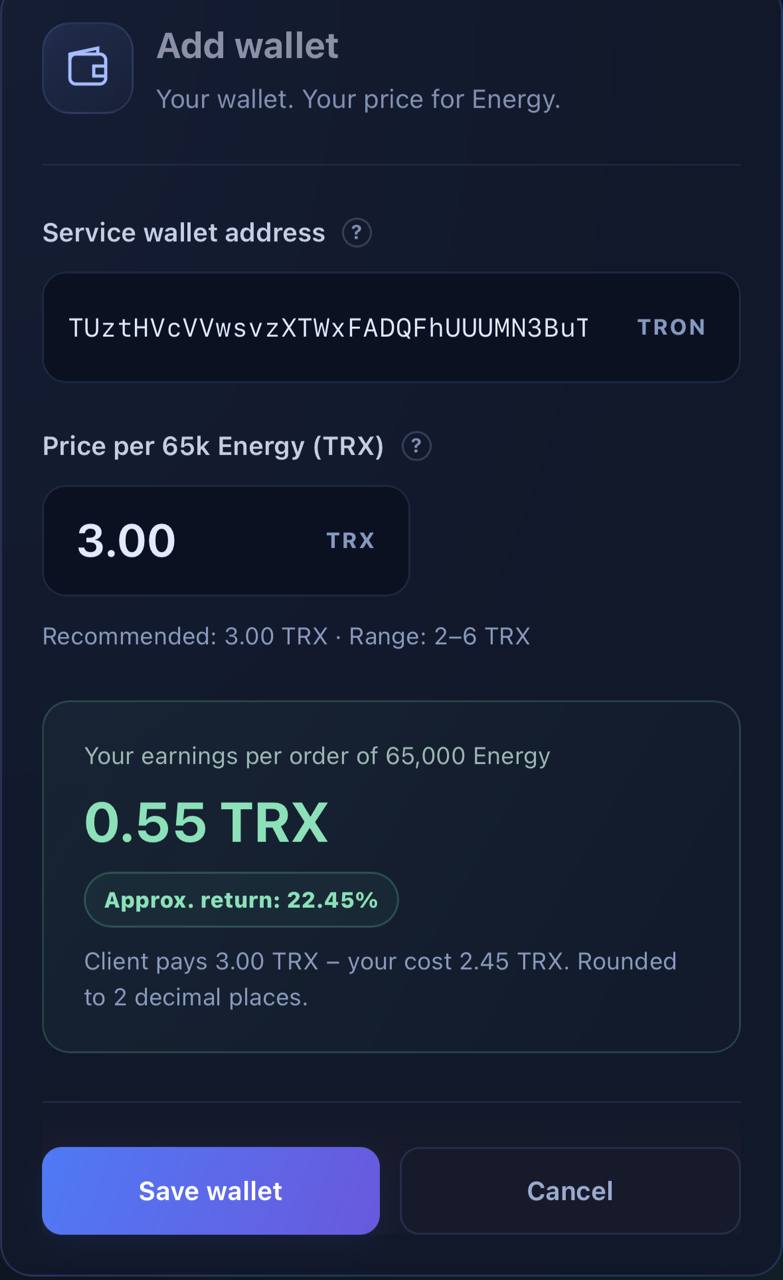
Open your GasFree4you account and go to the Subleasing tab. Open Add wallet. The screenshot shows a completed example; use your own address when setting up your service.
- Paste your dedicated TRON wallet’s public address into Service wallet address. Check the full address. Do not use an exchange address or copy the wallet from the screenshot.
- In Price per 65k Energy (TRX), enter what customers pay for 65,000 Energy. The example uses 3.00 TRX. This is your retail price, not the amount to deposit into your service balance.
- Review Your earnings per order: the displayed customer price of 3.00 TRX minus a 2.45 TRX cost leaves 0.55 TRX. Check the current form for guidance, permitted price range, and rates.
- Click Save wallet. Verify the saved address and price, fund your service balance, and then share the address with customers.
Find the payment and order status
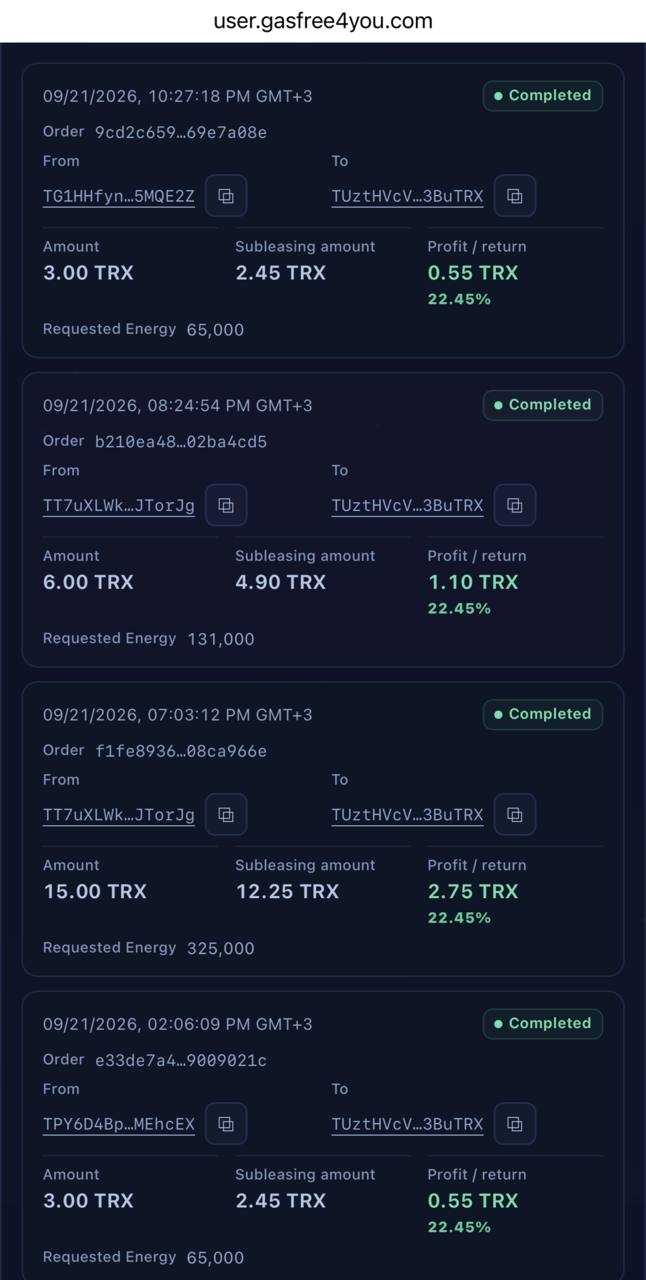
After TRX arrives, the operation appears in the subleasing feed with its status. Locate it using the time, Order ID, and From / To addresses. From is the payment sender who should receive Energy; To is your payment-receiving wallet.
The top operation in the screenshot is Completed, meaning the order has been fulfilled. It shows Amount 3.00 TRX, Subleasing amount 2.45 TRX, Profit / return 0.55 TRX, and Requested Energy 65,000. The feed connects the customer payment, subleasing cost, and order outcome.
- Amount is the customer payment to your wallet. That TRX stays with you.
- Subleasing amount is the order cost paid from your service account balance. It is not deducted from the customer payment in your wallet.
- Profit / return is the difference between payment and cost. Here, 0.55 / 2.45 × 100 ≈ 22.45%: the percentage is based on cost, not revenue. It describes this order, not an annual yield.
- Requested Energy is the amount of Energy in the order. Check the status separately: an entry appearing in the feed does not by itself mean delivery is complete.
If an order is not yet Completed, do not tell the customer that Energy has already arrived. Check your service balance and order details; for help, send support the Order ID and payment hash, never your recovery phrase or private key.
The 2.45 TRX cost, 0.55 TRX difference, and 22.45% apply to the displayed order. They illustrate an account record, not a guaranteed ongoing rate or income.
What your customer needs to know
Energy goes to the address that sent the TRX, not an address mentioned in a message. Customers should pay from their own TRON wallet that will later send USDT. An exchange withdrawal may originate from the exchange’s operational wallet, sending the Energy to the wrong place.
The payment amount must match your offer’s settings. Do not promise that an arbitrary deposit or incorrect amount automatically creates an order; consult the service terms and support for those cases.
Before sending USDT, the customer checks Energy delivery, rental validity, and the fee estimate. A 65,000 Energy offer does not guarantee coverage for every transfer: requirements depend on the operation. Bandwidth is separate.
Learn more: TRON · Resource model.
How your margin works
Gross margin per completed order = customer price − subleasing cost. If the customer pays 3 TRX and your current account rate is C TRX, the margin is 3 − C TRX. If C exceeds your price, that order has no positive margin.
For 100 identical completed orders, the calculation is 100 × (3 − C) TRX before advertising, transfers, taxes, and other expenses. This is a calculation, not a promise of order volume or returns.
Check the live rate in the subleasing form rather than relying on an old article or screenshot. The 3 TRX below is an actual payment in this example, not a mandatory price for every partner.
Learn more: GasFree4you · Subleasing.
A real example: three Tronscan transactions
The customer is TG1HHfynutuDyCcxog4Z7GthXaBv5MQE2Z. They pay TUztHVcVVwsvzXTWxFADQFhUUUMN3BuTRX, receive Energy, and then transfer USDT. All three transactions are confirmed with SUCCESS status.
Compare the payment sender, the Energy recipient, and the USDT sender: they are the same wallet. These addresses illustrate transaction history; they are not payment instructions.
1. The customer paid 3 TRX
A 3 TRX payment reached the receiving wallet. Its Bandwidth fee was zero because available resources covered this transaction.
2. The sender received Energy
Twelve seconds after payment, an ENERGY delegation to the customer’s address was recorded. Tronscan’s API reports approximately 65,008.56 Energy. This delivers a resource, not TRX to the customer.
3. The customer transferred 75 USDT
Thirty-six seconds after delegation, the customer sent 75 USDT. The transfer used 64,285 Energy, burned 0 TRX for Energy, and cost 0.345 TRX for Bandwidth.
Across these three transactions, the customer paid 3 TRX for rental + 0.345 TRX for Bandwidth = 3.345 TRX. The accurate description is ‘no TRX burned for Energy’, not ‘completely free’. This example’s timing and costs are not guarantees for future orders.
The blockchain confirms payments, addresses, and resource delegation. It does not show the partner’s internal account charge or rate. Check the service account for an order’s actual cost and margin.
Restrictions and wallet control
Before delegation, GasFree4you checks the intended Energy recipient against sanctions lists. Addresses found on those lists do not receive Energy. For unfulfilled orders, consult the service terms and support; an on-chain payment does not imply an automatic refund.
We monitor payments and delegate resources while your private keys remain yours. Never share your recovery phrase or private key, and never sign transactions to ‘verify’, connect, or activate your wallet in the service.
Learn more: GasFree4you · Subleasing.
Introduce the service to your audience
Start with a short guide in your blog or community: who needs Energy, the order price, which wallet to pay from, and how to check delivery. Use the three transactions above to demonstrate the process.
Before broad promotion, check the receiving address, price settings, and service balance. Test a first order using separate wallets you control for the partner and customer roles, so you understand the complete path.
You manage the offer, pricing, and customer relationships. GasFree4you handles payment detection, checks, and Energy delivery. Begin with a small audience and expand as demand grows.
Do I have to give access to my wallet?
No. You add a public address. Your recovery phrase and private key stay with you. Never sign transactions to ‘verify’, connect, or activate your wallet in the subleasing service.